 JobStream
An office manager
in your pocket.
Your calls, answered. Your jobs, booked. Your money, collected.
Set up in minutes. Book your first job today.
14-day free trial · No charge until day 15 · Cancel anytime
Sullivan Electric — caller asking about a panel upgrade.
Everything an office manager juggles — in one app
All of it is just JobStream.
How it works
From the first ring to money in the bank.
A call comes in and your office manager takes it from there — books it, hands it to a tech, and collects the money. You just do the work.
A call comes in
Day or night, it answers the phone — or the customer books themselves online.
The job gets booked
It checks your real calendar, takes the details, and books the right slot.
Your tech does the work
It lands on the schedule, assigned to a tech, with the address and notes.
The money comes in
Quote, invoice, card — collected. Then it chases anything left unpaid.
Answers the phone
The office manager who never misses a call.
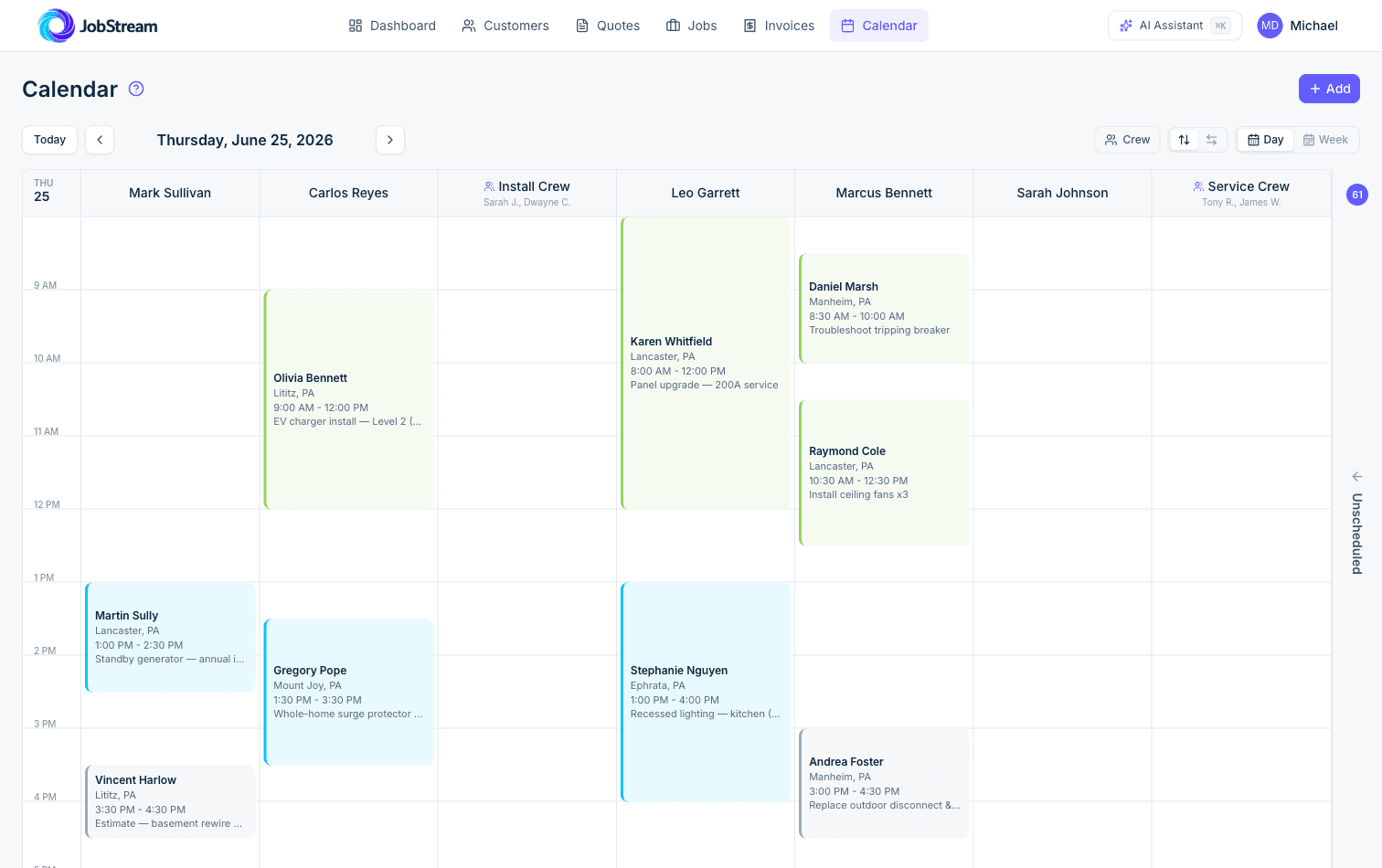
An answering service takes a message. JobStream answers the call, checks your real calendar, books the appointment, and texts the customer back — 24/7. Because the AI is part of your software, not bolted on top, it can actually do the work, not just talk.
- Answers every call, even after hours and on weekends
- Books straight into your live schedule — no double-bookings
- Reads you back every call with a summary and a recording
- Sends real emergencies straight to your phone
Online booking
Open for bookings while you sleep.
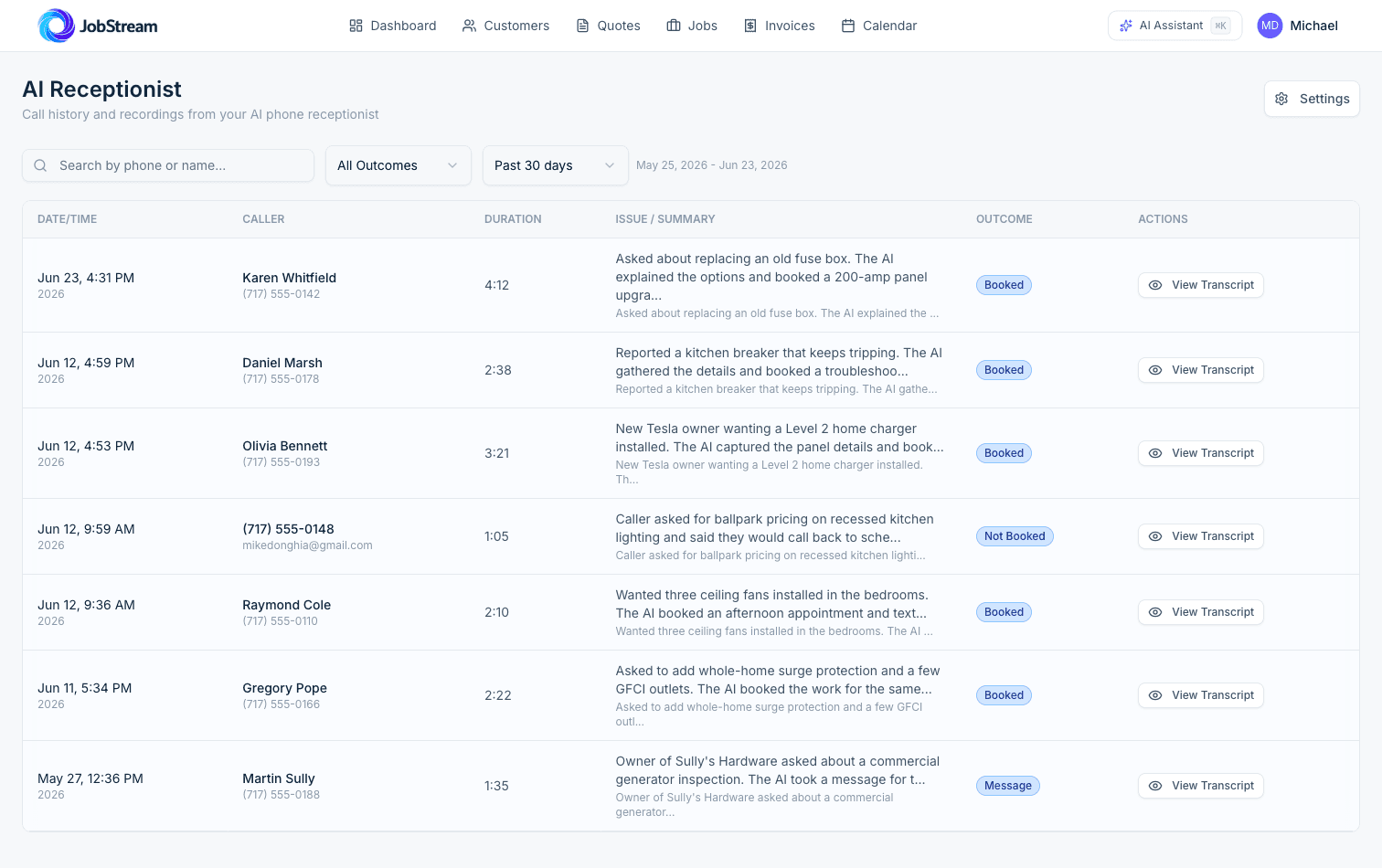
Put a booking link on your website and your Google profile. Customers pick a time that fits your real availability — and it drops onto the calendar assigned to the right tech, day or night.
- A clean booking page with your name on it
- Only offers times your crew is actually free
- Captures the address, the problem, and photos up front
- Works while you sleep
Schedule & dispatch
The whole crew's day, kept straight.
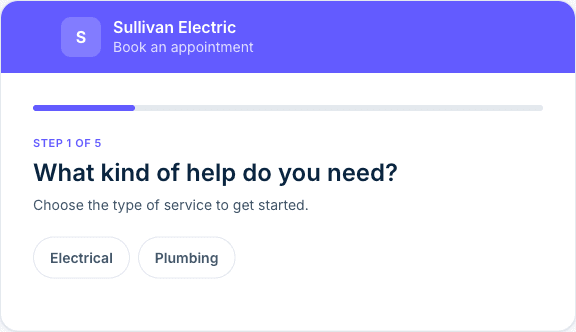
See the whole crew at a glance. Drag a job onto a tech, build crews that work together, and keep everyone moving — without a whiteboard or a group text.
- Color-coded day and week views
- Assign solo techs or full crews
- Arrival windows your customers can count on
- Unscheduled work never gets forgotten
Quotes · Invoices · Payments
Your money, collected — without the chasing.
The same office manager that books the job closes it out — so the money doesn't get stuck in a pile of paperwork on your dashboard.
Quotes that close
Send a clean, professional quote in a couple taps. The customer approves it online — and it becomes a job instantly.
Invoices on autopilot
Turn finished work into an invoice without re-typing a thing. Automatic reminders chase the ones that go unpaid.
Card & ACH payments
Customers pay online from the invoice. Money lands in your account — no separate card reader.
Syncs with QuickBooks
Already on QuickBooks? Invoices and payments flow over automatically. No double entry.
Built for the way you actually work
Powerful enough to run on. Simple enough to start today.
Take bookings the same day
No drawn-out setup project. Sign up, add the services you offer, and you're live in minutes. Want a hand? Onboarding help is there if you need it.
Stuck? Just ask.
A built-in assistant answers your questions in plain English — so you're not hunting through settings.
Right-sized for your crew
Built for crews doing the work — not watered down to also serve 500-truck operations. Less to learn, nothing in the way.
Every feature, every plan
Nothing is locked behind a higher tier. Every plan includes the whole product — you just pick your team size.
From the founders
“We built JobStream because the big platforms had become bloated, expensive, and a part-time job just to manage. A small crew shouldn't have to hire an office manager — or burn a week on setup — to run a tight operation. So we built the office manager into the app. No legacy, no bloat, and you can talk to the people who build it.”
Pricing
Every feature, every plan.
No features locked behind a higher tier — just pick the plan that fits your team. Free for 14 days, no charge until day 15.
More than 10 users? Email hello@jobstreamhub.com and we’ll set up a plan for the whole team — same full product, nothing extra to unlock.
AI Receptionist
Recommended add-onAdd a 24/7 AI receptionist to any plan. It answers your phone, books appointments into your real calendar, and texts customers back — so you never miss the call.
Questions, answered.
How long does it take to get set up?+
Minutes. You sign up, add the services you offer, and you can take your first online booking right away — no drawn-out setup project. If you'd like a hand getting going, onboarding help is available.
What does the AI receptionist actually do?+
It answers your phone, checks your real calendar, books the appointment, captures the customer's details, and texts them a confirmation. You get a summary and recording of every call, and true emergencies get routed straight to you.
Do my customers have to download an app?+
No. They book through a simple web link, and they can reschedule or pay their invoice from a link you send them — no app, no password.
I already use QuickBooks. Does this replace it?+
It works alongside it. Invoices and payments sync to QuickBooks automatically, so you're not entering anything twice.
Is this overkill for a one-person shop?+
No — it's built for exactly that. You only see what you need, and you can turn features on as you grow.
Is this powerful enough for a bigger team?+
Yes. Every tech gets their own login and schedule, jobs are assigned and tracked per person, and the AI receptionist and online booking keep the whole crew's calendar full without anyone manning the phones. You can see who's doing what at a glance, all in one place. Plans listed on this page go up to 10 users — with a bigger team, email hello@jobstreamhub.com and we'll set the right plan up.
Can I cancel anytime?+
Yes. Start with a 14-day free trial — you add a card to begin, but you're not charged until the trial ends, and you can cancel anytime before then. If it's not for you, walk away — your data is yours.
Put an office manager
in your pocket.
Your calls answered, your jobs booked, your money collected — from one app that sets up today. Free for 14 days.
Free for 14 days · No charge until day 15 · Cancel anytime